Sports
Add a new sport, partner program or Community Sports Camps sport, and set the fields that control how it appears across the website.
Each sport is a product in Shopify Admin under Products. Each camp for that sport is a variant of the product. This page covers the product. Camps are covered in Camps and locations.
There are three kinds of sport product.
| Kind | Example | How it is set up |
|---|---|---|
| ASC camp | Basketball Camps | Partner Camp metafield left blank or false |
| Partner program | A program run by a partner organisation | Partner Camp metafield set to true |
| Community Sports Camps | The single "Community Sports Camps" product | Partner Camp set to true, and the sport set on each variant |
Membership passes cannot be used on partner programs or Community Sports Camps.
Add a sport
The quickest way is to duplicate an existing sport of the same kind.
-
In Shopify Admin, go to Products and open an existing sport, for example Basketball Camps.
-
Click Duplicate. Give the copy the new sport's title, for example "Hockey Camps".
-
Update the description and images. The first product image is used on the home page Tabbed Carousel, and on camp cards when a variant has no image of its own.
-
Check the tags. Every sport product needs the tag
sport. Add the other tags as needed:Tag Effect sportRequired. Shows the Book Camp button and the booking form on the product page, and shows the line as a camp in the cart sport-filterShows the sport as a filter option on city pages, on the Tabbed Carousel, on the Full Camp Map and in the Camp Finder exclude-nav-itemHides the sport from menus and from the Camp Finder sport list -
Set the product metafields. Scroll to Metafields and click View all.
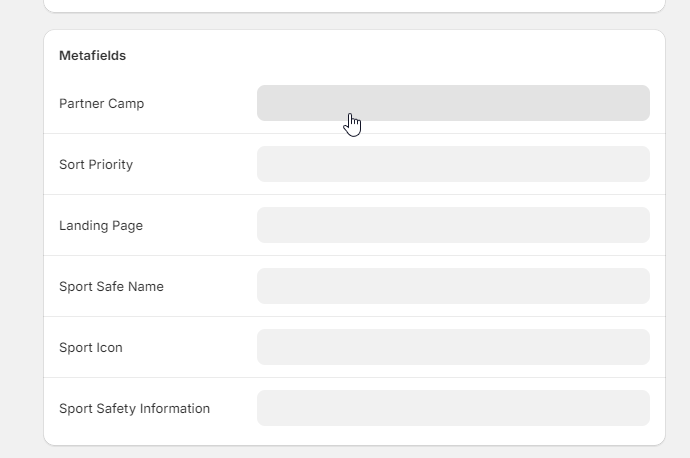
Metafield What to enter Sport Safe Name The sport's name as it should read on the website, for example "Hockey". Camp cards show it as "Hockey Camp" or "Hockey Program" Sport Icon The sport's icon file, used in menus and on camp cards. Icons are in the ASC Figma file Partner Sport Icon For partner programs only. Falls back to Sport Icon Partner Camp truefor a partner program. Leave blank for an ASC campLanding Page The sport page's address starting with /, for example/pages/hockey-camps. See Landing Page valueSort Priority A number. Higher numbers appear earlier on the Tabbed Carousel Sport Safety Information on the product is not shown on the website. The Safety section on the booking page uses the store-wide safety policy unless the variant has its own value.
-
Replace the duplicated variants with the new sport's camps. See Camps and locations.
-
Set Status to Active, and check that Online Store is listed under Sales channels in the Publishing card.
-
Add the product to the
campscollection. Go to Products, then Collections, opencampsand check the product is listed. If the collection adds products automatically, check that the new product meets its conditions.The theme setting All Sports Collection points at
camps. A sport that is not in it does not appear in menus, maps or the Camp Finder. -
Create the sport page and add the sport to city pages. See City and sport pages.
-
Add the sport to the Camps by city menu. See Navigation and footer.
Landing Page value
The Landing Page metafield is used as a link exactly as entered. Enter only the part of the address after the domain, starting with /, for example /pages/hockey-camps.
A link without the domain keeps visitors on whatever domain they are using, including preview links. A full address such as https://australiansportscamps.com.au/pages/hockey-camps would send preview visitors to the live site.
The sport page's handle must also follow the Sport Safe Name, because the Camp Finder builds its links from that name:
| Kind | Sport Safe Name | Page handle |
|---|---|---|
| ASC camp | Hockey | hockey-camps |
| Partner program | Hockey | hockey-programs |
| Two-word name | Rugby League | rugby-league-camps |
Partner programs
A partner program is set up in the same way as an ASC camp, with these differences:
- Set the product metafield Partner Camp to
true. - If partial attendance is allowed, add a third variant option named "Days Attending" alongside Week and Location.
- Use the
find-a-camp-sport-partnertemplate for its page, and a handle ending in-programs. - In the Camps by city menu, start the menu item title with
(PARTNER).
The website uses Partner Camp to place the program in the partner column of menus, show the "Partner Program" label on cards, use the partner map pin and disable membership passes. A "partner camp" tag has no effect.
Community Sports Camps
Community Sports Camps is one product that holds camps for several sports. Its title must contain "Community Sports Camps", and Partner Camp must be true. It also needs the tag csc, which SEO combo landing pages use to match its camps by each variant's sport.
Because the product covers several sports, set the sport on each variant rather than on the product. Open each variant and set its Sport Safe Name and Sport Icon metafields.
Verify the change
- Open the new product's page on the website in a private window. The Book Camp button should show.
- Open the sport page. Its camps should be listed, with the sport name in the card titles.
- Open a city page that runs this sport. The sport should appear as a filter option if it has the
sport-filtertag. - Use the Camp Finder on the home page to choose the sport. It should go to the sport page.
If camps are missing, follow A camp is not showing.
Developer map
| Concern | Source |
|---|---|
| Tag checks | theme/snippets/product-atc.liquid, theme/sections/camp-list.liquid, theme/snippets/camp-finder-sport-dropdown-items.liquid |
| Sport name and icon in cards | theme/snippets/camp-card.liquid, theme/snippets/partner-camp-card.liquid, theme/snippets/csc-camp-card.liquid |
| Camp Finder links | theme/assets/camp-finder.js |
| All Sports Collection setting | theme/config/settings_schema.json, group ASC - Camp Finder |
Background is in Catalogue model.