FAQs and reviews
Add and edit FAQ entries and categories, and manage the static reviews shown across the website.
FAQs and reviews are metaobject entries in Shopify Admin under Content, then Metaobjects. Every FAQs section and every Static Reviews section on the website shows all entries, so one edit updates every page.
The FAQs on the cart page are an exception. They are blocks in the cart section, described in Booking form and cart.
Add or edit an FAQ
-
Go to Content, then Metaobjects, then FAQ.
-
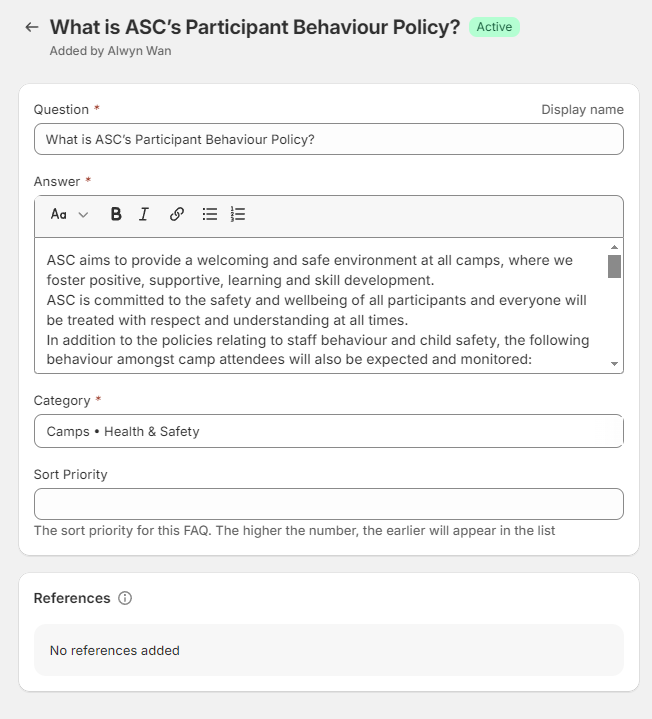
Click Add entry, or open an existing question.
-
Fill in the fields:
Field What to enter Question The question Answer The answer. Formatting and links are kept Category One or more categories. Each category becomes a tab above the questions Sort Priority A number. Higher numbers appear first. Leave blank to list it after numbered entries -
Save.
Tabs appear in the order their categories are first used, and the first tab is selected when the page loads.
Add a category
Categories are a fixed list on the FAQ definition.
- Go to Settings, then Custom data, and open the FAQ metaobject definition. You can also open it from the FAQ entries list.
- Open the Category field and add the new value to its list of choices.
- Save.
The new category can then be chosen on FAQ entries.
Search engine FAQ data
The FAQs section also adds FAQ data for search engines to the page. That data is written into the theme code and does not change when you edit FAQ entries. Ask a developer to update it when the main questions change.
Reviews
The Static Reviews section shows every entry of the static reviews metaobject.
- Go to Content, then Metaobjects, and open the static reviews definition.
- Add or edit an entry. The fields are reviewer name, review title, review content, rating and sort priority. Higher sort priority appears first.
- Save.
In the theme editor, the Static Reviews section's CTA Label and CTA Destination set the button below the reviews. A blank destination uses the Google Reviews URL in Theme settings, ASC - Google Reviews.
Verify the change
- Open the home page in a private window and scroll to the FAQs.
- Check the question appears under the right tab and in the right order.
- Check the reviews section on the home page.
Developer map
| Concern | Source |
|---|---|
| FAQs section and search engine data | theme/sections/faqs.liquid, theme/assets/faqs.js |
| Static reviews | theme/sections/static-reviews.liquid, theme/snippets/static-review.liquid |