Navigation and footer
Edit the header menu, the Camps by city menu, the Resources and Contact menus, and the footer link columns.
Menu links are edited in Shopify Admin under Content, then Menus. Which menu appears where, and how it is laid out, is set in the theme editor on the ASC Header and ASC Footer sections.
Menus in use
| Menu handle | Where it appears |
|---|---|
new-main-menu | Top-level header links |
camps-by-city-mega-menu | Drop-down under "Camps by city" |
resources | Drop-down under "Resources" |
contact | Drop-down under "Contact" |
new-sports | Footer, Sports column |
locations | Footer, Cities column |
join-the-team | Footer, Join The Team column |
legals | Footer, Legals column |
footer-contact | Footer, Contact column |
The main-menu and sports menus are not used by the header. The locations menu is used only in the footer.
Header menu
- Go to Content, then Menus, and open the menu with handle
new-main-menu. - Add, rename or reorder the top-level items.
- Save.
A top-level item with a drop-down does not link anywhere when clicked. It opens the drop-down instead, so that tablet users can reach the links.
Camps by city drop-down
The camps-by-city-mega-menu menu has one item per city, and under each city one item per sport page.
| Menu level | Title | Link |
|---|---|---|
| City | The city name, for example "Melbourne" | The city page |
| Sport, ASC camp | The sport name, for example "Basketball Camps" | The city and sport page, or the sport page |
| Sport, partner program | (PARTNER) followed by the program name, for example "(PARTNER) Golf Programs" | The program page |
Keep these rules when you add items:
- Start partner program titles with
(PARTNER), including the brackets, capitals and the space. On desktop this puts them in the partner column and hides the prefix. - Include the sport's Sport Safe Name in the title. The mobile menu lists sports from the All Sports Collection and only shows a sport when a title under the city contains its name.
To add a city, add a top-level item for it with its sport items nested underneath. The "View all Melbourne Camps" link comes from the city item's link.
Drop-down settings in the theme editor
- Open the theme editor from Online Store, Themes, Customize.
- Select ASC Header in the left sidebar.
| Setting | What it controls |
|---|---|
| Menu | The header menu. Currently new-main-menu |
| Get Started label and destination | The header button |
| Camps by city, Title | Heading above the city list |
| Camps by city, ASC Camps Title and Partner Camps Title | Column headings |
| Camps by city, View All CTA | Link text. {CITY} is replaced with the city name |
Each drop-down is a Mega Menu block:
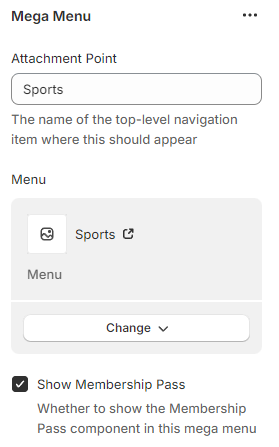
| Block setting | What it does |
|---|---|
| Attachment Point | The exact title of the top-level item the drop-down opens from, for example "Camps by city". Capitals and spaces must match |
| Menu | The menu to show. The layout depends on the menu. Only camps-by-city-mega-menu, resources, contact, sports and locations have a layout |
| Show Membership Pass | Shows the membership pass promotion in the drop-down on desktop |
The Sports and Cities blocks are turned off. Their layouts build the list from products and City entries and ignore the links in their menus.
A Menu Item Style block changes the weight, colour, italics or underline of one menu item, identified by its handle.
Footer
- In the theme editor, select ASC Footer.
- Each column is a Menu Links block with a Title and a Menu. A blank Title uses the menu's own title.
- About Label and About Text set the text beside the logo.
The copyright line at the very bottom is set in the Copyright Bar section's Outer bottom text. The field with the same name on ASC Footer is not shown.
The Footer Copy section holds the Acknowledgement of Country.
The SEO Footer Links section, which lists city and sport pages from the seo-footer-links menu, is turned off.
Verify the change
- Open the website in a private window at desktop width. Hover over each changed top-level item and check the drop-down.
- Narrow the window, or use a phone, and check the mobile menu. The mobile Camps by city menu is built differently from desktop, so check both.
Developer map
| Concern | Source |
|---|---|
| Header and blocks | theme/sections/asc-header.liquid, theme/sections/header-group.json |
| Drop-down layout by menu handle | theme/snippets/desktop-mega-menu.liquid, theme/snippets/mobile-mega-menu.liquid |
| Camps by city | theme/snippets/desktop-camps-by-city-submenu.liquid, theme/snippets/mobile-camps-by-city-submenu.liquid |
| Footer | theme/sections/asc-footer.liquid, theme/sections/footer-group.json |