Australian Sports Camps documentation
How the Australian Sports Camps Shopify storefront is run, how it is built, and how to change it safely.
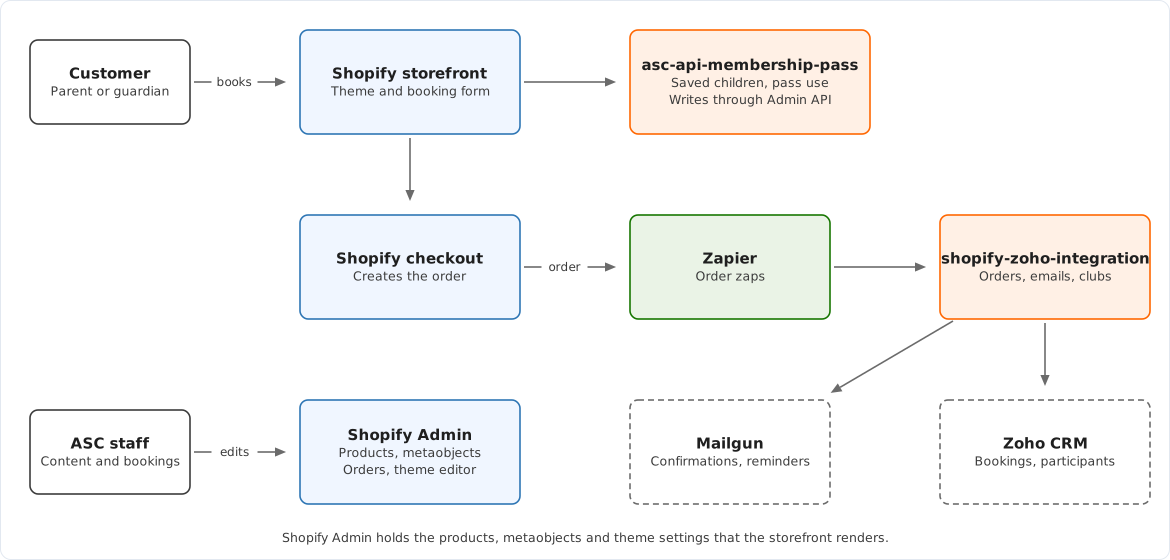
The Australian Sports Camps (ASC) website is a Shopify store. Parents book school holiday camps for their children through a custom booking form, pay at Shopify checkout, and the booking is then sent to Zoho CRM, which ASC uses to run the camps.
These pages cover the asc-shopify-src repository and its theme submodule. Systems that live elsewhere, such as Zapier, Zoho CRM and the two Cloud Run services, are described where this repository depends on them.
Pick your path
If you manage camps, pages, prices or content, start in Operations. Each page names the screen that owns a value and explains how to check that a change has worked.
If you change code, start in the Developer guide. It explains the two repositories, the build and the release process.
If something is not working, go to Runbooks.
If you need the exact name of a metafield, setting, script or tag, go to Reference.
Who owns what
| Change | Owner | Where it happens |
|---|---|---|
| Sports, camps, prices and stock | ASC staff | Shopify Admin, Products |
| Locations, cities, FAQs, flyers and reviews | ASC staff | Shopify Admin, Content, Metaobjects |
| Page layout, headings, images and theme settings | ASC staff | Shopify theme editor |
| Menus | ASC staff | Shopify Admin, Content, Menus |
| Bookings, participants and camp reporting | ASC staff | Zoho CRM |
| Booking form, cart, maps and page templates | Developer | asc-shopify-src and asc-shopify-theme |
| Saved children and membership pass use | Developer | asc-api-membership-pass service |
| Order sync to Zoho and customer emails | Developer | Zapier and shopify-zoho-integration service |
The detail is in Architecture.
Four things to know before you change anything
The theme editor writes straight to the live theme, and Shopify commits those edits back to the main branch of the theme repository. A developer who merges an out-of-date branch can overwrite them. See Releasing a change.
Code in src/ is compiled into theme/assets/, which belongs to the theme repository. A change to the booking form needs a commit in both repositories before it reaches the storefront.
The google-cloud-api/ folder in this repository is no longer what the storefront calls. Saved children and membership pass use moved to the separate asc-api-membership-pass service in June 2026. See Legacy and unused code.
A camp only appears on the storefront if its variant has a SKU and is not marked out of season. See Camps and locations.
Documentation layout
| Section | Answers |
|---|---|
| Operations | Where do I change this, and how do I check it worked? |
| Architecture | How does it work, and which system owns it? |
| Developer guide | Which files do I change, and what must change with them? |
| Runbooks | Something is broken. What do I check first? |
| Reference | What is the exact name of this field, setting or script? |
Keeping these docs accurate
These pages describe the main branches of asc-shopify-src and asc-shopify-theme as at 17 September 2026. Three pieces of work were unmerged at that date and will change what is described here: revised membership pass messaging in the cart, the city and sport page redesign, and the NSW Active Kids and Creative Kids banner. Update the affected pages in the same pull request as each change.
The pages live in doc-site/content/. Diagrams come from doc-site/content/diagrams/generate.mjs. Edit that file and run node doc-site/content/diagrams/generate.mjs from the repository root, which rewrites each SVG and its Excalidraw source. Do not edit the generated files by hand.