Membership passes
Find members, read and correct a customer's pass balance, and understand what customers see in the cart.
A membership pass lets a customer book a number of ASC camps without paying for each one. The pass balance is stored on the customer's account in Shopify, and the purchase is recorded in Zoho.
Customers use a pass by clicking a button in the cart. No discount code is involved.
Find members
-
In Shopify Admin, go to Customers, then Segments.
-
Open the segment you need.
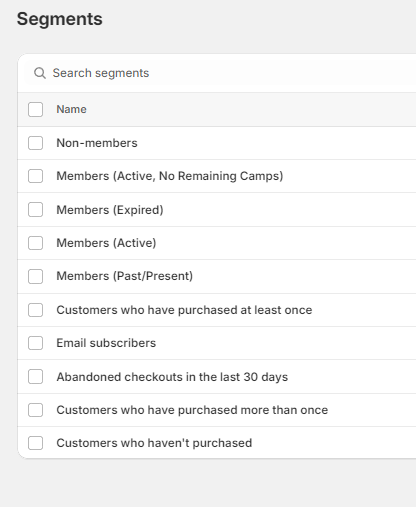
| Segment | Customers |
|---|---|
| Members (Active) | Pass in use |
| Members (Active, No Remaining Camps) | Pass still marked active but all camps used |
| Members (Expired) | Pass marked expired |
| Members (Past/Present) | Anyone who has held a pass |
| Non-members | Everyone else |
Segments can be used for email campaigns to members.
Read or correct a customer's balance
-
Go to Customers and open the customer.
-
Find the Metafields card.
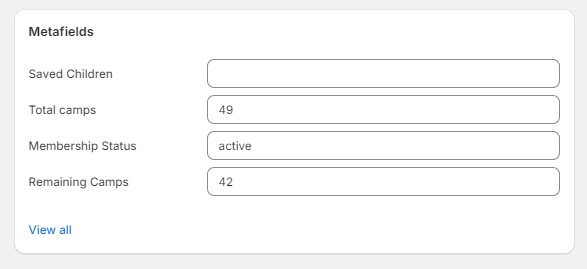
| Metafield | Meaning |
|---|---|
| Membership Status | Must be exactly active for the pass to work |
| Total camps | Camps bought across the customer's passes |
| Remaining Camps | Camps left. Must be above 0 for the pass to work |
| Saved Children | Children saved from earlier bookings, used to fill in the booking form |
The balance is updated automatically when a pass is bought and after each checkout that uses a pass. Change it by hand only to correct an error. Record the correction in Zoho as well, because Zoho keeps its own Membership Purchase record and does not read the Shopify values.
The pass expiry date is kept only in Zoho. The website does not check it. To stop an expired pass being used, change Membership Status to expired.
What customers see in the cart
For each camp in the cart:
| Customer | Sees |
|---|---|
| Not logged in | "Login to use membership pass", which goes to the login page |
| Logged in, no active pass or no camps left | "Membership pass not applicable for this camp" |
| Logged in with a pass, camp is a partner program or Community Sports Camps | "Membership pass not applicable for this camp". Clicking explains that passes only apply to camps run by ASC |
| Logged in with a pass, ASC camp | "Use membership pass" |
When the customer clicks Use membership pass, the camp in their cart is replaced by a $0 copy titled "Membership Pass:" followed by the camp name. The participant details are kept. The customer then checks out as usual.
The logged-out wording can be changed in the theme editor. Open the Cart template, select ASC New Cart Layout, and edit Login Text. The other wording is theme language text under the membership_pass group, which can be changed through the theme's Edit default theme content option or by a developer.
Pass products in the Products list
Each use of a pass creates a product titled "Membership Pass: …" with the tag membership-pass-product. These are needed for the order and are archived automatically by Zapier about 15 minutes later.
They cannot be opened on the website, because their template redirects to the home page.
Do not delete them, and do not use them as ordinary products. To see them, go to Products and filter by the tag membership-pass-product.
Selling passes
Pass products are listed on the memberships page from the membership-passes collection. The number of camps in a pass and its validity (12 months for 3 camps, 18 months for 5, 24 months for 7) are set in the Zoho integration, so a new pass size needs a developer.
Verify
- Log in on the website as a test customer with Membership Status
activeand Remaining Camps above 0. - Add an ASC camp to the cart and click Use membership pass.
- The camp line should change to "Membership Pass: …" at $0.
If it does not, follow The membership pass is not applying.
Developer map
| Concern | Source |
|---|---|
| Cart button logic | theme/sections/asc-new-cart-layout.liquid |
| Button click | src/js/custom.js |
| Button wording | theme/locales/en.default.json, keys under membership_pass |
| Pass use service | asc-api-membership-pass repository |
| Purchase and balance updates | asc-api-src-zoho-integration repository, src/features/membership-pass/ |
Background is in Membership passes.