Bulk data
Export camps to a spreadsheet with Matrixify to check or change many of them at once, then import the changes.
Matrixify is a Shopify app for exporting store data to a spreadsheet and importing changes back. It is the quickest way to check SKUs, seasons and prices across every camp, or to change many camps at once.
Open it from Shopify Admin under Apps, then Matrixify, or search for Matrixify in the Shopify search bar.
Check every camp with the Seasonal Sports template
A saved template named "Seasonal Sports" exports each camp with its in-season flag, SKU and prices.
-
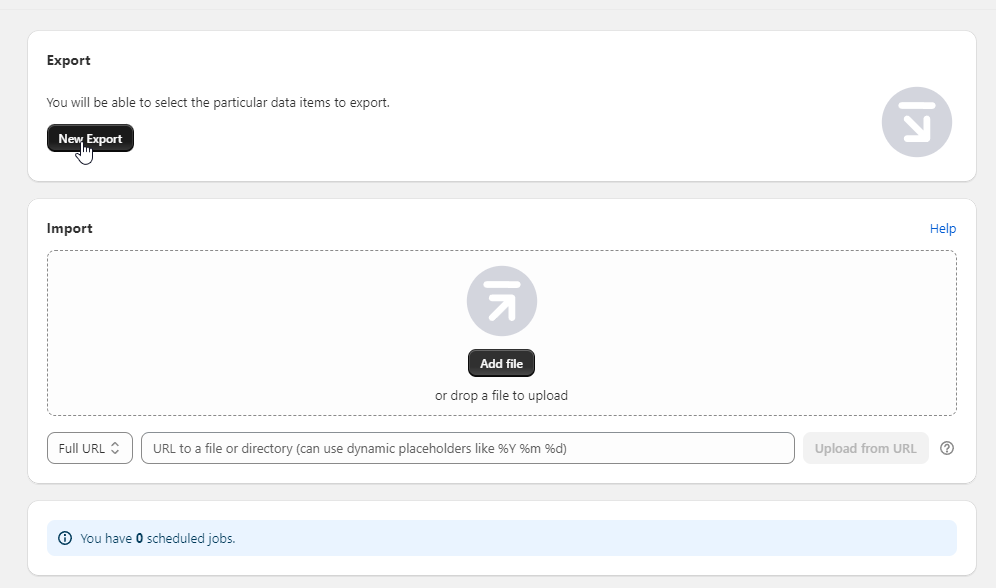
In Matrixify, click New Export.
-
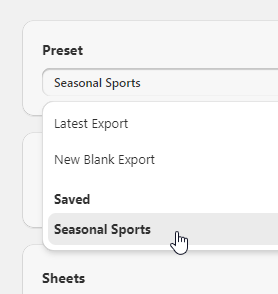
Choose Seasonal Sports from the template list.
-
Click Export. The other options can be left as they are.
-
When the export finishes, a green banner appears with a download link. Open the file in Excel or Google Sheets.
Use the export to find camps that will not show on the website. A camp is hidden if its SKU is blank or its In Season value is false. See Camps and locations.
Import changes
- Edit the spreadsheet. Keep the column headings and the ID columns unchanged, because Matrixify uses them to match rows to camps.
- In Matrixify, click Import and upload the file.
- Check the import summary Matrixify shows before confirming.
- Open a few of the changed camps on the website to check the result.
An import changes the live store straight away. Export a copy of the current data first, so it can be re-imported if the change is wrong.