Booking and orders
How a camp booking moves from the product page, through the booking form and checkout, into Zoho CRM and the customer's inbox.
A booking is a Shopify cart line with the participant's details stored as line item properties. Shopify takes payment, and the booking only reaches Zoho once Zapier passes the paid order to shopify-zoho-integration.
From product page to cart
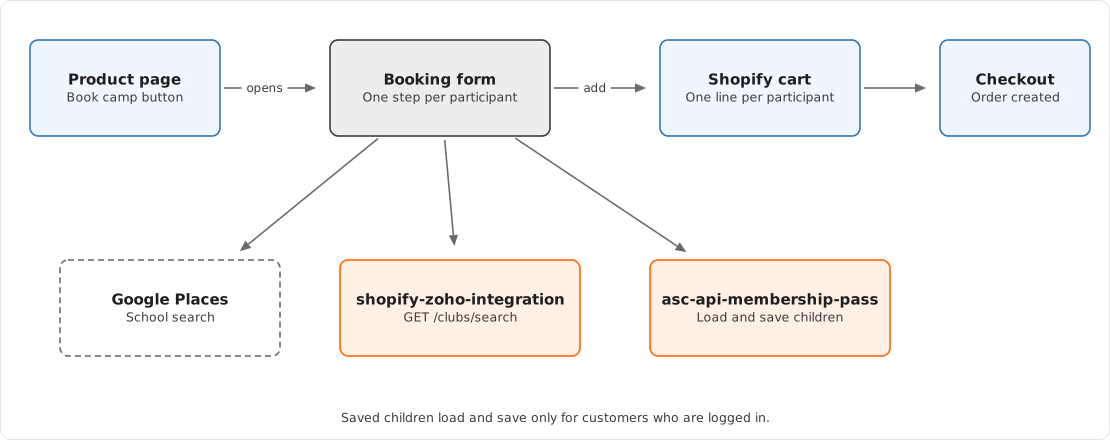
- The customer picks a camp on a sport or city page and lands on the product page with that variant selected. Every product page URL carries
?variant=, and thetheme.productlayout redirects to add it if it is missing. - The customer chooses how many participants to book, up to 10 and never more than the variant's stock, and clicks Book Camp. The button is disabled when the variant is sold out or out of season.
- The booking form opens over the page. It shows one step per participant, with two parts: participant details, then playing experience.
- A logged-in customer can pick a child saved from an earlier booking instead of typing the details again.
- When the last participant is complete, the form adds one cart line per participant, each with quantity 1, and sends the customer to
/cart. - If the customer typed new children rather than choosing saved ones, the form also saves each child to their account. This request is not awaited, so the page can move to the cart before every save finishes.
A camp card can open the booking form directly. When the section setting "Reveal booking form when a camp card is selected" is ticked, the card link adds &start_booking to the product URL and the form opens on page load.
The participant fields and the property names they produce are listed in Booking line item properties.
Cart
The live cart is the "ASC New Cart Layout" section. For each line whose product is tagged sport it shows the participant details and the membership pass button. Other products show a simple product line.
The cart also shows:
- an upsell block, driven by the variant metafield Upsell Product;
- FAQs, reviews and selling points, which are blocks in the cart section rather than metaobjects;
- a checkout button that sends a
checkout_clickedanalytics event before it submits.
Membership passes are covered in Membership passes.
From order to Zoho

When checkout completes, three Zapier zaps start from the new order.
| Zap | Calls | Result |
|---|---|---|
| Shopify → Zoho via API | POST /orders | Bookings, participants, families, children and product purchases in Zoho |
| Confirmation Emails via API | POST /emails | Confirmation email to the customer |
| Membership Pass Purchase via API | POST /memberships | Membership purchase in Zoho and pass balance on the Shopify customer |
POST /orders sorts the order's lines by product tag:
| Product tag | Processed as |
|---|---|
sport | A booking, with one participant per line |
ecommerce-product | A product purchase |
| Neither | Ignored |
The service also reads the order metafield custom.environment and skips any order whose environment is not in its allowed list. An order with no value is treated as production. Nothing in this repository sets that metafield.
Inside Zoho, workflow functions run when the records are created. They calculate family and parent spend, camp booking counts, early bird counts and membership usage. Copies of those functions are in misc/deluge-scripts/, but the live versions are in Zoho.
Emails
shopify-zoho-integration builds every booking email and sends it through Mailgun from ASC-Bookings@australiansportscamps.com.au.
| Trigger | Content source | |
|---|---|---|
| Booking confirmation | Zapier, when the order is created | Variant and product metafields custom.email_template, custom.email_subject, custom.email_templates_what_to_bring, custom.email_templates_pickup_times |
| 7-day reminder | Daily scheduled call to POST /emails/cron | Same metafields, with custom.email_subject_reminder |
| 2-day reminder | Same daily call | Same |
The service records each email it sends in Firestore, so a repeated trigger does not send a second copy. The schedule itself is configured in Google Cloud, not in any repository.
Early bird dates
Zoho needs to know whether a booking was made at the early bird price. The integration looks up the Early Bird Dates metaobject whose handle is the camp's season in lower case, a hyphen and the year, for example spring-2026. The same lookup runs when camps are uploaded to Zoho and when a camp swap is completed. Create the entry for a season before its camps go on sale. See Pricing and early bird.
Failure modes
| Symptom | Likely cause |
|---|---|
| Book Camp button is greyed out | Variant sold out, or In Season is false |
| Booking form does not open | camp-booking.bundle.js failed to load, or the product is not using the theme.product layout |
| School search shows no results | Google Places key restricted or missing from the build |
| Club search shows no results | shopify-zoho-integration unreachable, or the endpoint missing from the build |
| Order paid but no booking in Zoho | Zap turned off or errored, the /orders call failed, or the order's environment was skipped |
| Customer received no confirmation | "Confirmation Emails via API" zap, Mailgun, or missing email template metafields |
| Saved child is missing some details | Known issue, see Booking form |
Diagnosis steps are in The booking form is not working and A booking is missing in Zoho.
Source map
| Concern | Location |
|---|---|
| Book Camp button and quantity | theme/snippets/product-atc.liquid, theme/assets/main-product.js |
| Booking form mount point and config | theme/layout/theme.product.liquid |
| Booking form | src/js/camp-booking.js, src/components/CampBooking.tsx, src/components/ParticipantDetails.tsx |
| Validation rules | src/components/models/ParticipantDetailsSchema.tsx |
| Add to cart | src/components/utils.tsx |
| Live cart | theme/sections/asc-new-cart-layout.liquid, theme/assets/cart-layout.js |
| Checkout event | theme/snippets/asc-track-checkout.liquid |
| Order processing, emails | asc-api-src-zoho-integration repository, src/features/orders.ts, src/features/bookings.ts, src/features/emails.ts |