Booking form
How the React camp booking form is mounted, configured, validated and submitted, the requests it makes, and its known issues.
The booking form is a React 18 app built from src/ into theme/assets/camp-booking.bundle.js, with its dependencies in vendors-booking.bundle.js. It runs only on pages using layout/theme.product.liquid.
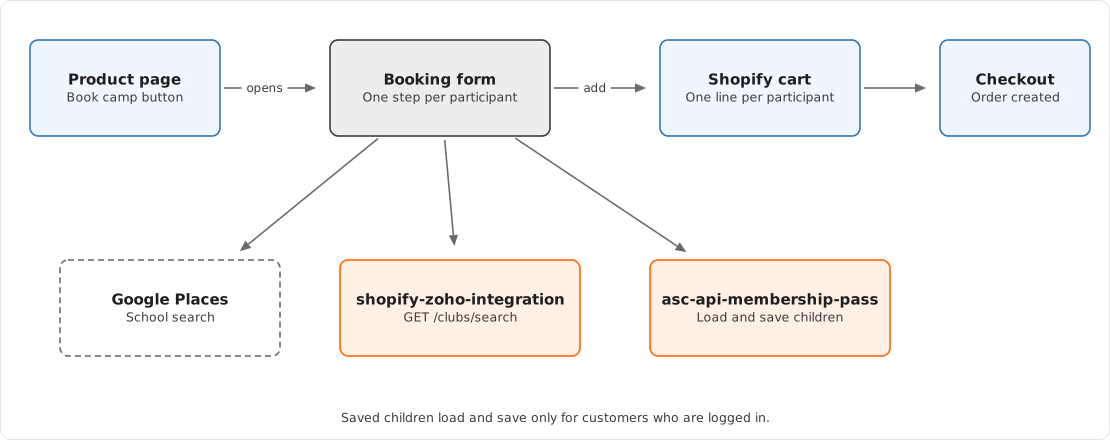
Start-up
-
theme.product.liquidrenders an empty#camp-booking-rootand writeswindow.theme.campBookingConfigfrom the ASC - Camp Booking theme settings. -
src/js/camp-booking.jsdefineswindow.startCampBooking. -
The Book Camp button,
.book-camp-ctaintheme/snippets/product-atc.liquid, calls it throughtheme/assets/main-product.js. Astart_bookingquery parameter on the URL calls it on load. -
startCampBookingloads the Google Maps JavaScript API with the Places library, reads the participant count from#qty, and renders<CampBooking>into the root with:{ ...window.theme.campBookingConfig, api: window.theme.api, customer: window.Shopify.customer, } -
After 100 milliseconds it adds the
activeclass to the root, which fades the form in.
#qty offers 1 to 10 participants, capped at the variant's stock when inventory is tracked. It is rendered only when the variant is available and In Season is not false.
Components
CampBooking                  src/components/CampBooking.tsx
└─ ParticipantsContext       src/components/ParticipantsContext.tsx
   ├─ StickyTitle            desktop header, close button, Google reviews badge
   └─ BookingBody            hero image
      ├─ MobileTitle
      └─ one per participant, only the current one visible
         ├─ SavedChildrenDropdown   logged-in customers with saved children
         └─ ParticipantDetailsForm  src/components/ParticipantDetails.tsx
            ├─ SchoolAutocomplete   Google Places
            ├─ ClubsAutocomplete    shopify-zoho-integration
            └─ PreviousParticipantButton
Fields and validation
Validation uses react-hook-form with the Zod schema from src/components/models/ParticipantDetailsSchema.tsx, built from the theme settings.
| Field key | Input | Rule |
|---|---|---|
First Name, Last Name | Text, 255 characters | Required |
Middle Name | Text | Optional |
Date of Birth | Date input on mobile, day, month and year on desktop | Age between date_of_birth_min_age and date_of_birth_max_age, defaults 4 and 16 |
Gender | Male, Female, Other | Required |
Has Confidential Gender Info, Confidential Gender Info | Switch and text area | Optional, 255 characters |
School | Google Places search | Required |
Grade | 0 (Prep) to 12 | Defaults to 0 |
Club or Team Name | Club search, or free text | Required |
_ClubId | Hidden | Zoho club id when a listed club is chosen |
Playing Experience | Beginner, Intermediate, Accomplished | Required |
Has Friends Attending, Friends Attending | Switch and text area | Optional |
Has Medical Conditions, Medical Conditions | Switch and text area | Optional |
The field key is also the cart line property name. Zoho mapping in asc-api-src-zoho-integration reads those names, so renaming a key is a change in both repositories.
Date of Birth defaults to today, so it fails validation until the parent changes it.
Submitting
- Each participant step calls
updateParticipantDetails. The last step setsreadyToSubmit. finalSubmitinCampBooking.tsxbuilds one cart item per participant, with quantity 1 and the fields as properties. It formatsDate of Birthasdd MMMM yyyyand drops theHas …switches, keeping the related text only when its switch was on.- If the children were typed rather than chosen from saved children, it starts saving each child to
asc-api-membership-pass. The chain of saves is not awaited. - It posts the items to
{Shopify.routes.root}cart/add.jsand setswindow.location.hrefto the cart.
The exact properties are listed in Booking line item properties.
Requests
| Request | When | Service |
|---|---|---|
| Google Maps JavaScript API with Places | Form opens | |
GET {ZOHO_INTEGRATION_API_ENDPOINT}/clubs/search?q=…&limit=10&offset=0 | Typing in club search, debounced 500 ms | shopify-zoho-integration |
GET {theme.api.root}v1/customers/{id}/children | Form opens, logged in | asc-api-membership-pass |
POST {theme.api.root}v1/customers/{id}/children/save | Submit, new children only | asc-api-membership-pass |
POST {Shopify.routes.root}cart/add.js | Submit | Shopify |
Saved-children requests send text/plain bodies containing the JSON encoded twice with btoa.
ZOHO_INTEGRATION_API_ENDPOINT and GOOGLE_PLACES_API_KEY are inlined at build time from src/.env. src/js/camp-booking.js also contains the Maps key as a literal in its loader, so a key change needs both updated and a rebuild.
Saved children
The service stores each child as a child metaobject and lists them in the customer metafield children.saved_details. GET …/children returns each child's fields with title-cased names, which SavedChildrenDropdown.tsx maps back to form keys.
| Returned field | Form key |
|---|---|
Date Of Birth | Date of Birth |
Club Team Name | Club or Team Name |
Has Confidential Gender Information | Has Confidential Gender Info |
Confidential Gender Information | Confidential Gender Info |
| Others | Same name |
A logged-in customer can choose between "Choose from kids" and "Add new kids" for each participant. loadedFromSavedChildren is a single flag for the whole booking that reflects the last choice made. In a booking that mixes saved and new children, either none of the new children are saved, or the saved children are saved again as duplicates, depending on which was chosen last.
Known issues
These were found by reading the code and have not been confirmed against production.
| Issue | Effect | Where |
|---|---|---|
The client sends Has Confidential Gender Info. The service reads Has Confidential Gender Information | Confidential gender information is never saved with a child | CampBooking.tsx, service children.service.ts |
The service does not store Friends Attending or _ClubId | Those values are blank when a saved child is chosen | Service children.service.ts |
| Saves are not awaited before the redirect to the cart | Later saves in a multi-child booking may be cancelled by the page change | CampBooking.tsx, finalSubmit |
btoa only accepts characters up to U+00FF | A name containing, for example, an emoji or "ł" makes that save fail silently | CampBooking.tsx |
Text areas call replace(',', '\r\n') on each change | Typed commas become line breaks. In pasted text only the first comma is replaced | ParticipantDetails.tsx |
A second schema, participantDetailsSchema, and validateInputs in CampBooking.tsx are never called | None. Dead code that can be mistaken for the live rules | CampBooking.tsx |
lodash is imported but not declared in src/package.json | Build breaks if misc/ is removed | ClubsAutocomplete.tsx |
| Babel strips types without checking them | Type errors never fail the build | src/babel.config.json |
Changing the form
| Change | Files |
|---|---|
| A label or placeholder | No code. Theme settings, ASC - Camp Booking |
| A new setting | theme/config/settings_schema.json, theme/layout/theme.product.liquid config object, src/components/types.d.ts |
| Options for Gender, Grade or Playing Experience | src/components/ParticipantDetails.tsx |
| Validation | src/components/models/ParticipantDetailsSchema.tsx |
| A new field | Schema, ParticipantDetails.tsx, CampBooking.tsx property building, then the Zoho mapping in asc-api-src-zoho-integration and, if it should be remembered, asc-api-membership-pass and SavedChildrenDropdown.tsx |
After any change, run the build and commit theme/assets/camp-booking.bundle.js and vendors-booking.bundle.js in the theme repository. See Releasing a change.
Theme structure
How the ASC theme is organised, which layout loads which bundles, the globals the JavaScript relies on, and which files are generated or unused.
Cart and membership pass
The live cart section, the JavaScript behind its buttons, the membership pass request, and the disabled cart code that still sits beside it.